Encode faster. In parallel.
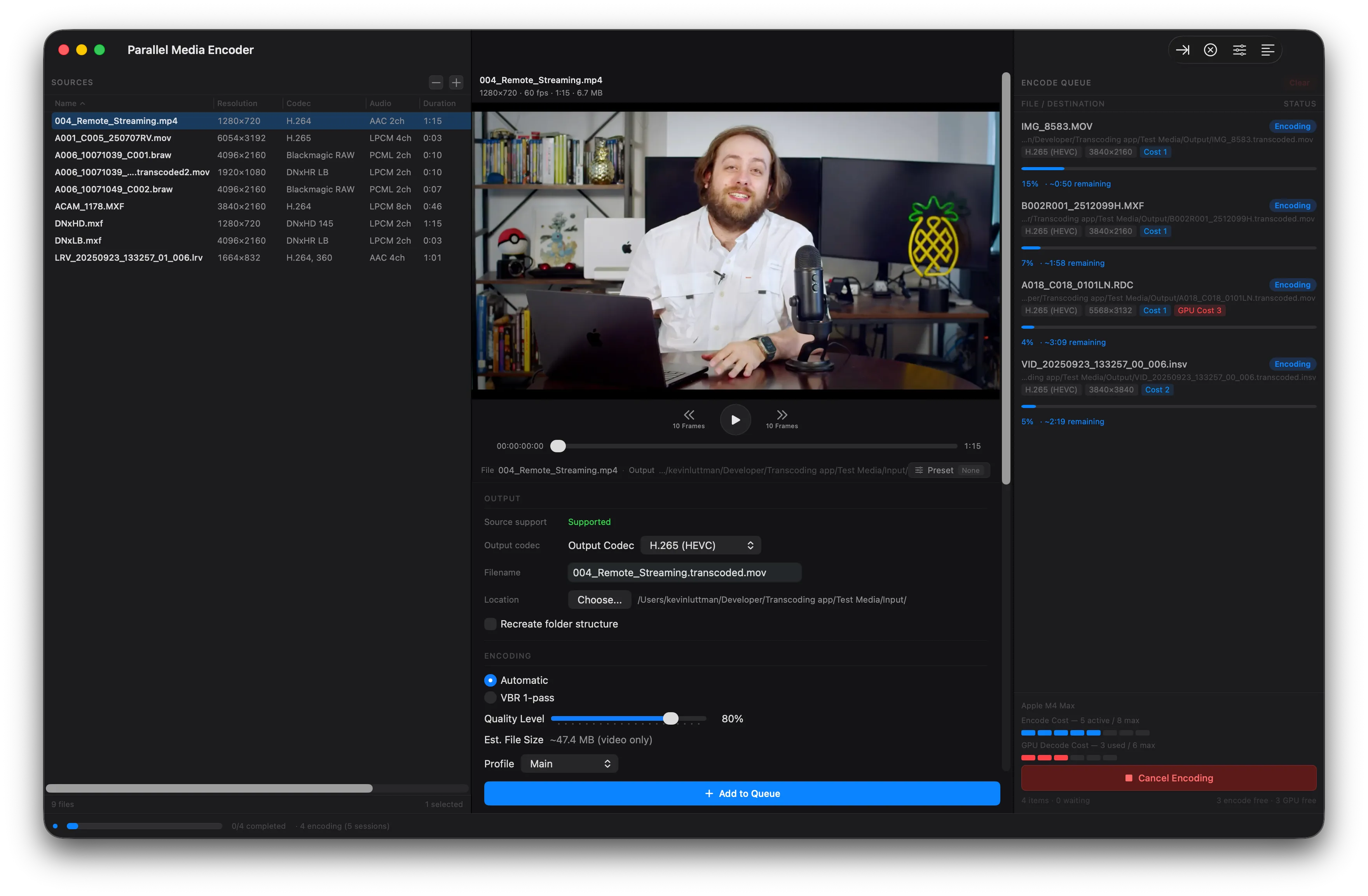
The only macOS transcoder that encodes multiple files simultaneously using Apple Silicon hardware media engines.
Free tier encodes one file at a time. No credit card required. Unlock parallel for $39.
Built for professionals
Everything you need for high-volume transcoding, designed for Apple Silicon from the ground up.
Parallel Encoding
Encode 2–10 files simultaneously — 39% faster in benchmarks. Hardware-aware scheduling adapts to your Apple Silicon chip, from MacBook Neo to M3 Ultra.
Professional Codecs
H.264, H.265, and the full ProRes family included free. DNxHR/DNxHD and camera RAW encoding with Pro.
Color Science
HDR pass-through and tone mapping included. 3D LUT application and RAW exposure control with Pro.
Why parallel encoding is faster
Your Apple Silicon Mac has dedicated hardware media engines built for video encoding. Traditional transcoders only use one at a time — the rest sit idle. Parallel Media Encoder keeps them all busy.
Traditional (Sequential)
SlowEach file waits its turn. 197 seconds.
Parallel Media Encoder
39% fasterAll 8 files encode at once. 119 seconds.
197s
sequential, one at a time
119s
parallel, 8 at a time
78s saved
per 8-file batch on M4 Max
Measured on Apple M4 Max · 8 × 60s 4K MXF → H.265 · See full benchmark details
Complete control over every encode
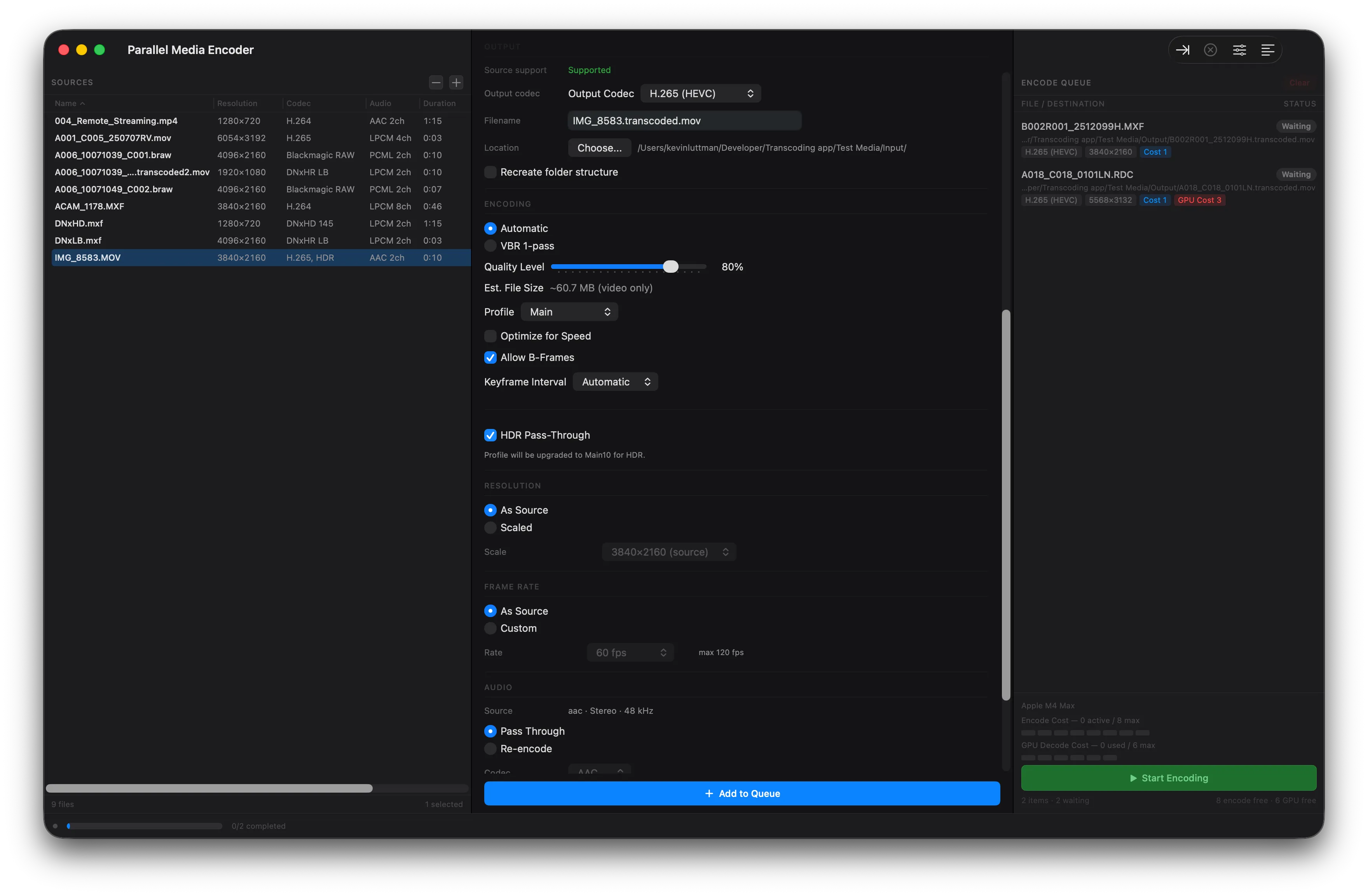
- Quality modes — Automatic, Manual Bitrate, or VBR Two-Pass encoding
- Resolution scaling — keep source resolution or scale to custom dimensions
- Frame rate conversion — match source or set a custom frame rate
- HDR pass-through — preserve HDR metadata or tone map to SDR
- Audio options — pass-through or re-encode to AAC, FLAC, Opus, and more
See how we compare
Parallel Media Encoder delivers features that other transcoders don't.
| Feature | Parallel Media Encoder | HandBrake | EditReady |
|---|---|---|---|
| Parallel Encoding | 2–10 simultaneous | No | Yes |
| Hardware Acceleration | Apple Silicon media engines | Limited (VideoToolbox) | Limited |
| ProRes Output | Full family (Proxy–4444 XQ) | No | Yes |
| DNxHR / DNxHD Output | Yes (Pro) | No | No |
| RAW Input (BRAW, R3D, ProRes RAW) | Yes (Pro) | No | No |
| H.264 / H.265 Output | Yes | Yes | Yes |
| 3D LUT Support | Yes (Pro) | No | No |
| Custom Presets | Yes (Pro) | Yes | Limited |
| HDR Support | Pass-through + tone mapping | Limited | Limited |
| Two-Pass VBR | Yes | Yes | No |
| Price | Free / $39 Pro | Free | $49.99 |
| Platform | macOS (Apple Silicon) | Cross-platform | macOS |
Optimized for your chip
Parallel Media Encoder detects your Apple Silicon chip tier and automatically configures the optimal number of simultaneous encodes — no manual tuning required.
Learn more about parallel encodingEvery codec you need
From camera RAW to delivery formats — Parallel Media Encoder handles your entire post-production pipeline.
Input Formats
Output Codecs
Frequently asked questions
Is Parallel Media Encoder free?
What Apple Silicon chips are supported?
How many files can I encode at once?
What codecs does Parallel Media Encoder support?
What's the difference between Free and Pro?
Start free, upgrade when you're ready
Download and start transcoding immediately. Unlock parallel encoding, DNx, RAW, and more with Pro.
Free
- H.264 / HEVC / ProRes output
- Built-in presets
- Video preview & drag-and-drop
- Auto-updates
- One encode at a time
- No DNx, RAW encode, LUTs, or overlays
Pro
- Everything in Free, plus:
- Parallel encoding (2–10 simultaneous)
- DNxHR & DNxHD output (all variants)
- RAW encode (BRAW, R3D, ProRes RAW)
- HEVC Main10 4:2:2 & ProRes alpha
- 3D LUT & overlay burn-in
- Custom presets (save/edit/export/import)
- RAW exposure control
One-time purchase. No subscription.
Full feature comparison
| Feature | Free | Pro |
|---|---|---|
| Single-file transcode | 1 job at a time | Unlimited concurrent |
| H.264 (all profiles) | ||
| HEVC Main / Main10 | ||
| HEVC Main10 4:2:2 | ||
| ProRes (Proxy–4444 XQ) | ||
| ProRes alpha pass-through | ||
| DNx (all variants) | ||
| RAW codecs (BRAW, R3D, ProRes RAW) | Import & preview only | |
| LUT support | ||
| Timecode/text overlay burn-in | ||
| Custom presets | ||
| Built-in presets | ||
| RAW exposure control | ||
| Auto-updates |
Ready to encode faster?
Download Parallel Media Encoder for free and upgrade when you need parallel power.
Download FreeRequires macOS 14.5 or later. Apple Silicon required.