- A001_0417_R1.MXF
- A001_0418_R1.MXF
- A001_0419_R1.MXF
- A018_C018_0101LN_001.R3D
Encoding complete. Parallel encoding finishes up to 39 percent faster than sequential on Apple M4 Max.
Encode faster. In parallel.
Put your Mac to full use, leverage every media engine to get time back in your workflow.
Free tier includes batch queue and 2 simultaneous encodes. No credit card required. Free for personal, educational, and evaluation use. Unlock full parallel for $39.
The first media encoder MCP built for professional post-production.
Connect Claude or Codex and describe the transcoding rules for an entire project in plain English. The assistant probes every clip, proposes the settings for each one, and sends the approved jobs to PME’s parallel queue.
- By resolution “UHD to ProRes 422 HQ, HD to 422 LT.”
- By file name “Anything with INT gets timecode burn-in.”
- By audio channels “Keep all 8 channels on interviews, stereo for the rest.”
Free with the app. Encodes run locally, and PME never uploads your media files or audio.
Found 148 clips from 3 cameras. Here's the plan:
✓ All 148 done in /Volumes/RAID/Harbor/Transcodes. Heads-up: 2 B-cam clips are 29.97 fps in a 23.976 project. I left them as shot. Want me to import the clips into Resolve?
What users say
Parallel Media Encoder feels like the first transcoding software that was actually built by someone who uses transcoding software. Oh, and it's fast. Really fast.

Brian Chahley
CEO, Streamwell
Ready to save time?
Buy Now for $39Built for professionals
Everything you need for high-volume transcoding, designed for Apple Silicon from the ground up.
Parallel Encoding
Encode 2–10 files simultaneously and finish 39% faster in benchmarks. Hardware-aware scheduling adapts to your Apple Silicon chip, from MacBook Neo to M5 Ultra.
Professional Codecs
H.264, H.265, and the full ProRes family are included free. Pro adds DNxHR/DNxHD and camera RAW support for BRAW, R3D, Nikon N-RAW, ProRes RAW, ARRIRAW/ARRI HDE via the official ARRI Image SDK, and Canon Cinema RAW Light (.CRM).
Color Science
HDR pass-through and tone mapping included. 3D LUT application and RAW exposure control with Pro.
Why parallel encoding is faster
Your Apple Silicon Mac has dedicated hardware media engines built for video encoding. Traditional transcoders only use one at a time while the rest sit idle. Parallel Media Encoder keeps them all busy.
Traditional (Sequential)
SlowEach file waits its turn. 197 seconds.
Parallel Media Encoder
39% fasterAll 8 files encode at once. 119 seconds.
Complete control over every encode
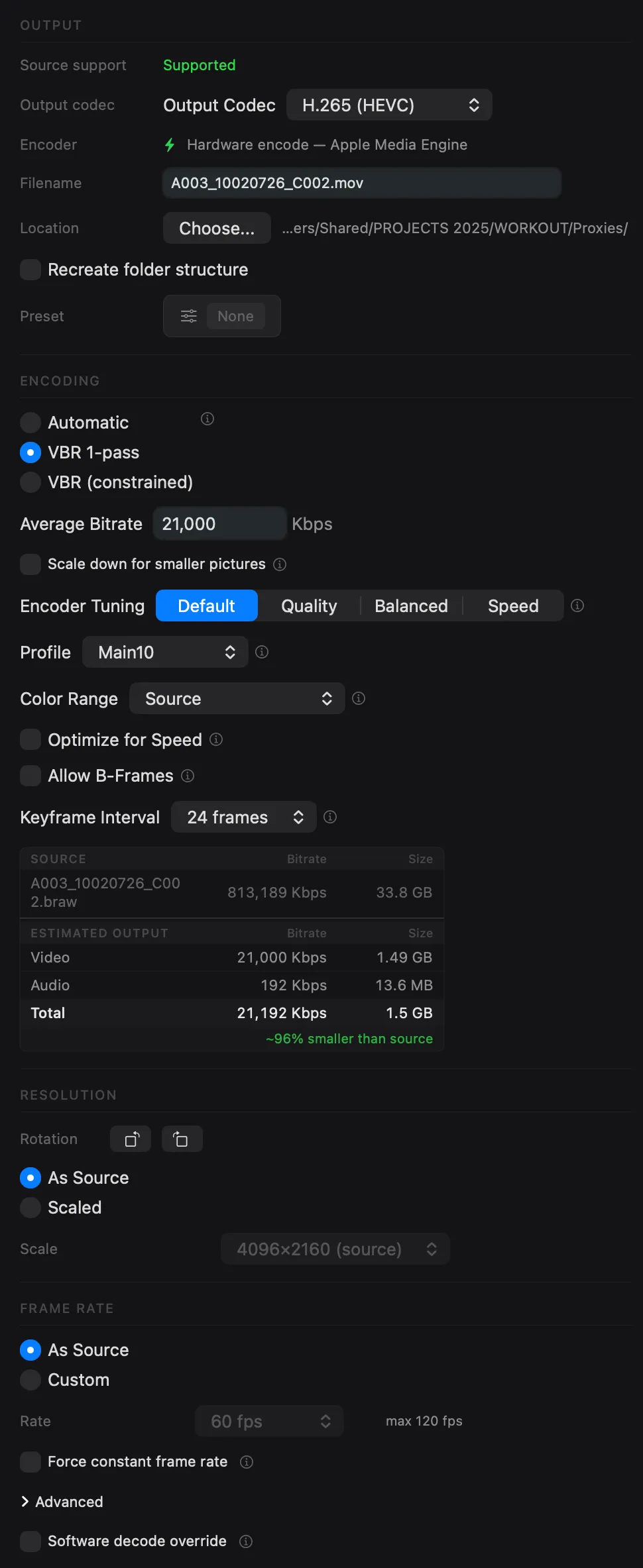
- Quality modes: Automatic, Manual Bitrate, or VBR Two-Pass encoding
- Resolution & rotation: keep source resolution or scale to custom dimensions, with 90/180/270° rotation
- Frame rate conversion: match source or set a custom frame rate
- HDR pass-through: preserve HDR metadata or tone map to SDR
- Audio options: pass-through, or re-encode to AAC, ALAC, or PCM
See how we compare
Parallel Media Encoder delivers features that other transcoders don't.
| Feature | Parallel Media Encoder | HandBrake | EditReady |
|---|---|---|---|
| Parallel Encoding | 2–10 simultaneous | No | Yes |
| Hardware Acceleration | Apple Silicon media engines | Limited (VideoToolbox) | Limited |
| ProRes Output | Full familyProxy to 4444 XQ with alpha passthrough | No | Yes |
| DNxHR / DNxHD Output | Yes (Pro) | No | Yes |
| RAW Input (BRAW, R3D, N-RAW, ProRes RAW, ARRI, Canon CRM) | Yes (Pro) | No | Yes ($149 Pro) |
| Standard 8-bit H.264 / H.265 Output | Yes | Yes | Yes |
| H.265 Output Control (8/10-bit, 4:2:0/4:2:2) | Yes, you choose | No | Pass-through only |
| 3D LUT Support | Yes (Pro) | No | Yes |
| Custom Presets | Yes (Pro) | Yes | No |
| Video Rotation | Yes | No | No |
| Timecode Overlay | Yes (Pro) | No | Yes |
| Metadata Preview | Yes | No | No |
| Metadata Pass-through | Yes | No | No |
| MCP Server for AI (Claude, Codex, Gemini) | Yes, built inYour AI probes clips and fills the queue | No | No |
| Watch Folders | Yes (Pro) | No | Yes ($149 Pro) |
| Insta360 Metadata Pass-through | Yes | No | No |
| HDR Support | Pass-through + tone mapping | Limited | Limited |
| Price | Free / $39 Pro Buy Now for $39 | Free | $49 / $149 Pro |
Optimized for your chip
Parallel Media Encoder detects your Apple Silicon chip tier and automatically configures the optimal number of simultaneous encodes. No manual tuning is required.
Learn more about parallel encodingEvery codec you need
From camera RAW to delivery formats | Parallel Media Encoder handles your entire post-production pipeline.
Input Formats
Output Codecs
Frequently asked questions
Is Parallel Media Encoder free?
Can I use the free version for client work?
I'm an employee. My company hasn't bought it. Can I use Free at work?
Is Pro per person or per Mac?
We're a studio with ten suites. How do we buy?
We're a film school. Is it free for our lab?
What Apple Silicon chips are supported?
How many files can I encode at once?
What codecs does Parallel Media Encoder support?
What's the difference between Free and Pro?
Does Parallel Media Encoder support watch folders?
Start free, upgrade when you're ready
Free for personal, educational, and evaluation use. Pro for paid work, with full parallel encoding, RAW, DNx, and more.
Free
For personal, educational, and evaluation use
- H.264 / HEVC / ProRes output
- JPEG image sequences
- Batch queue (up to 8 files)
- 2 simultaneous encodes
- Built-in presets
- Video preview & drag-and-drop
- Auto-updates
- No DNx, DPX/TIFF/EXR sequences, RAW encode, LUTs, or overlays
Pro
Per Mac · Commercial use · One-time
- Everything in Free, plus:
- Parallel encoding (2–10 simultaneous)
- DNxHR & DNxHD output (all variants)
- DPX, TIFF & OpenEXR image sequences
- RAW encode (BRAW, R3D, N-RAW, ProRes RAW, ARRI, Canon CRM)
- HEVC Main10 4:2:2 & ProRes alpha
- 3D LUT & overlay burn-in
- Custom presets (save/edit/export/import)
- Watch folders (auto-transcode new files)
- RAW exposure control
One-time purchase. No subscription.
Already have a key? Add seats to it
Requires internet access for activation and periodic license validation. Pro features may be restricted after 30 days without a successful check.
Full feature comparison
| Feature | Free | Pro |
|---|---|---|
| Permitted use | Personal, educational, evaluation | Any, including commercial |
| Batch transcode queue | 8 queued, 2 concurrent | Full chip-tier concurrency |
| H.264 (all profiles) | ||
| HEVC Main / Main10 | ||
| HEVC Main10 4:2:2 | ||
| ProRes (Proxy–4444 XQ) | ||
| ProRes alpha pass-through | ||
| DNx (all variants) | ||
| Image sequences | JPEG only | DPX, TIFF, OpenEXR, JPEG |
| RAW codecs (BRAW, R3D, N-RAW, ProRes RAW, ARRI, Canon CRM) | Import & preview only | |
| LUT support | ||
| Timecode/text overlay burn-in | ||
| Custom presets | ||
| Watch folders | ||
| Built-in presets | ||
| RAW exposure control | ||
| Auto-updates |
Ready to encode faster?
Download Parallel Media Encoder for free and upgrade when you need parallel power.
Download FreeRequires macOS 14.5 or later. Apple Silicon required.
Get the download link sent to your email