Transcode ARRIRAW, HDE & ARRICORE to ProRes on Mac
Decoded by the official ARRI Image SDK. Full LogC3 and LogC4 color, embedded ARRI looks applied on the fly, and every metadata field preserved. New to the formats? See ARRICORE vs ARRIRAW.
Requires macOS 14.5 or later. Apple Silicon required.
Every ARRI field, read straight from the clip
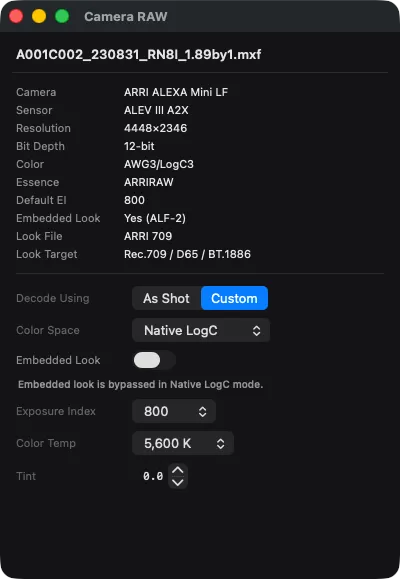
Drop an ARRI MXF on PME and the Camera RAW panel populates from the file itself: sensor, resolution, bit depth, color space, essence type, default EI, embedded look, look file, and look target. No probing, no guessing.
Built for every ALEXA
ARRI MXF files from the modern ALEXA 35 and Mini LF through the older Mini, SXT/XT, LF, and 65, all read through the official ARRI Image SDK.
| Camera | Container | Codec | Resolution | Supported |
|---|---|---|---|---|
| ARRI ALEXA 35 | MXF | ARRIRAW / ARRI HDE | Up to 4.6K · EI 160 to 6400 | |
| ARRI ALEXA Mini LF | MXF | ARRIRAW / ARRI HDE | Up to 4.5K LF · EI 160 to 3200 | |
| ARRI ALEXA LF / 65 | MXF | ARRIRAW / ARRI HDE | Up to 4.5K LF / 6.5K Open Gate | |
| ARRI ALEXA Mini | MXF | ARRIRAW | Up to 3.4K Open Gate | |
| ARRI AMIRA | MXF | ProRes (also handled by PME) | Up to 3.2K | |
| ARRI ALEXA SXT / XT | MXF | ARRIRAW | Up to 4K |
AMIRA records ProRes natively and is handled through PME's standard ProRes path. Exposure-index range and frame-rate metadata are preserved end to end.
ARRICORE vs ARRIRAW vs ARRI HDE
ARRIRAW is uncompressed sensor data with the largest files. ARRI HDE is lossless compression of ARRIRAW at roughly half the size. ARRICORE is ARRI's newer JPEG XS pre-debayered format, smaller again and faster to decode. PME decodes all three with the official ARRI Image SDK.
ARRIRAW
Uncompressed Bayer sensor data, straight from the ALEXA. The largest files on disk and the most flexibility in post, with full grading latitude and every photon as captured.
Best for: feature finishing, VFX hand-off, anything that may be regraded.
ARRI HDE
High-Density Encoding: a lossless wavelet compression of ARRIRAW developed with Codex. Roughly half the file size with no image-data loss, identical color science to uncompressed ARRIRAW.
Best for: most modern productions. Same quality, half the storage bill.
ARRICORE
ARRI's newer JPEG XS-based pre-debayered intermediate. Smaller and faster to decode than ARRIRAW, with debayer locked in at record time. The fastest of the three to transcode.
Best for: high-throughput dailies, episodic, anywhere speed matters.
| ARRIRAW | ARRI HDE | ARRICORE | |
|---|---|---|---|
| What it stores | Bayer sensor data | Bayer sensor data | Pre-debayered image |
| Compression | Uncompressed | Lossless wavelet (developed with Codex) | JPEG XS based |
| Debayer | In post | In post | Locked in at record time |
| File size | Largest | Roughly half of ARRIRAW | Smallest |
| Best for | Feature finishing, VFX, regrades | Most modern productions | Dailies and episodic at volume |
Full LogC pipeline, every modern delivery space
LogC3 and LogC4 sources, eight target color spaces, optional embedded look application. Choose the deliverable; PME handles the math.
ALEXA Mini, SXT, classic ALEXA. The established log curve.
ALEXA 35 and Mini LF. The new log curve with extended highlights.
Apply the embedded on-set look during transcode, or leave it off to preserve grading flexibility.
Standard HD broadcast / web delivery
HDR10 mastering, 10-bit perceptual quantizer
UHD SDR, wider gamut than Rec.709
Hybrid Log-Gamma for broadcast HDR
Digital cinema and HDR display mastering
Legacy ARRI log for ALEXA Mini / SXT
New log for ALEXA 35 / Mini LF
Pass-through. Match the source exactly.
Debayer mode is configurable: ADA5 (default, highest quality), ADA7, or Proxy 4×4 for fast preview.
Every ProRes flavor, picked for the job
Apple ProRes Proxy through 4444 XQ. Choose the bitrate and chroma that match what you're delivering.
| Flavor | Sampling | Use case |
|---|---|---|
| ProRes Proxy | 10-bit 4:2:2 | Fast offline edit, dailies-to-edit pipelines |
| ProRes 422 LT | 10-bit 4:2:2 | Lower-bitrate broadcast deliverables |
| ProRes 422 | 10-bit 4:2:2 | Standard online and master copies |
| ProRes 422 HQ | 10-bit 4:2:2 | Most common ARRI ProRes recording mode, the natural sibling for dailies |
| ProRes 4444 | 12-bit 4:4:4 | VFX hand-off, finishing, alpha-channel deliverables |
| ProRes 4444 XQ | 12-bit 4:4:4 | Highest-bandwidth ProRes, for archival and master grades |
ARRI footage is also encodable to H.264, H.265 (including Main10 4:2:2), and DNxHR/DNxHD if your delivery spec calls for them. See all encoding options.
70+ ARRI metadata fields preserved
Every reel name, scene, take, lens, look, and timecode value the camera wrote, read and carried into the output. Your dailies pipeline, edit, and DIT logs stay intact.
…and roughly 40 more, including image-processing model, audio track layout, framelines, and processing flags. Everything ARRI writes, PME reads.
Free to preview. $39 to encode.
Try every ARRI feature on real footage before you pay. The encode path is the only thing behind the Pro line.
- Import ARRIRAW, ARRI HDE, ARRICORE
- Preview and scrub in full quality
- Read full metadata, including ALF looks
- Encode to any ProRes / H.265 / DNxHR
- All 8 target color spaces, optional ALF look
- Watch folders, CLI, REST API, Shortcuts
ARRI transcoding FAQ
What ARRI cameras does Parallel Media Encoder support?
ARRICORE vs ARRIRAW: what is the difference, and where does ARRI HDE fit?
Does PME's ARRI decode match ARRI's own tools?
Can I transcode ARRIRAW MXF files that hang or refuse to open on Mac?
How does this compare to the ARRI Reference Tool?
Can I use PME instead of DaVinci Resolve just for ARRI dailies?
Does PME apply embedded ARRI looks (ALF) in the file?
How much does ARRI support cost?
Free to preview ARRI footage. $39 to encode.
Download Parallel Media Encoder and drop an ALEXA card on it. See for yourself before you pay.
Download FreeRequires macOS 14.5 or later. Apple Silicon required.
Get the download link sent to your email