
Transcode Canon .CRM Cinema RAW Light to ProRes on Mac
Drop in your .CRM files and get back edit-ready ProRes with your Canon color, exposure, and metadata intact. Built on Canon's own RAW engine, so it looks just the way you shot it.
Requires macOS 14.5 or later. Apple Silicon required.
Every Canon field, read straight from the clip
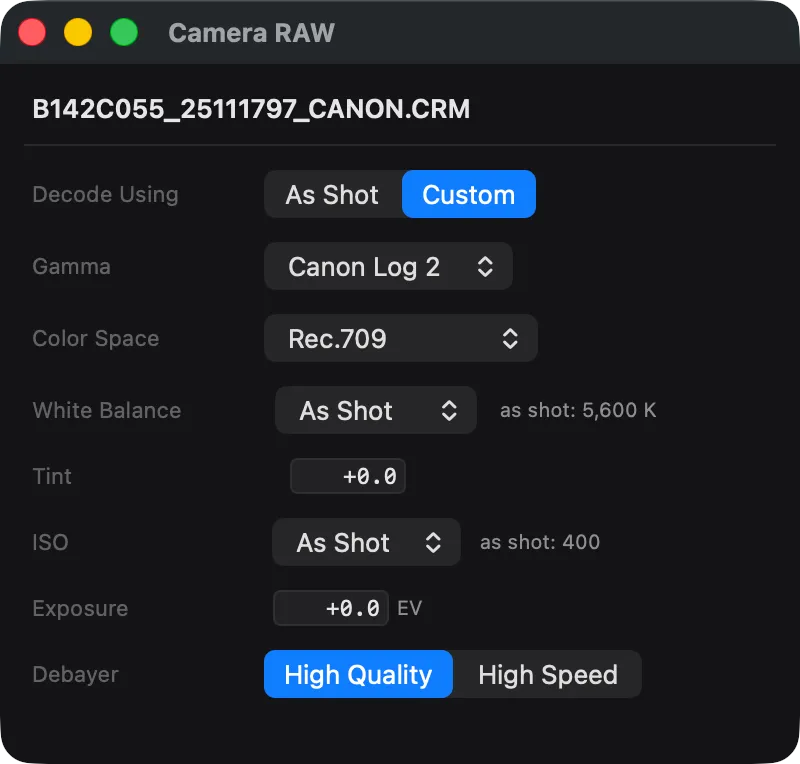
Drop a .CRM on PME and the Camera RAW panel populates from the file itself: camera model, capture resolution, bit depth, RAW type, recorded gamma and gamut, ISO, and white balance. No probing, no guessing.
Built for the Cinema EOS line
Cinema RAW Light .CRM files from the C500 Mark II, C300 Mark III, C70, EOS R5 C, C200, and C700 FF, all developed through Canon's official Cinema RAW Development SDK.
| Camera | Container | Codec | Resolution | Supported |
|---|---|---|---|---|
| Canon EOS C500 Mark II | CRM | Cinema RAW Light | Up to 5.9K full-frame | |
| Canon EOS C300 Mark III | CRM | Cinema RAW Light | Up to 4K Super 35 (DGO) | |
| Canon EOS C70 | CRM | Cinema RAW Light | Up to 4K Super 35 (DGO) | |
| Canon EOS R5 C | CRM | Cinema RAW Light | Up to 8K full-frame | |
| Canon EOS C200 / C200B | CRM | Cinema RAW Light | Up to 4K (Cinema RAW Light) | |
| Canon EOS C700 FF | CRM | Cinema RAW Light | Up to 5.9K full-frame |
Newer bodies that record Cinema RAW Light to .CRM, including the EOS R5 and R5 Mark II, are handled the same way. Resolution, frame rate, ISO, and lens metadata are preserved end to end.
Cinema RAW Light HQ, ST, and LT: what's the difference?
Three quality levels of the same .CRM format, each a different trade between disk footprint and grading latitude. PME decodes all three identically.
Cinema RAW Light HQ
The highest-quality level, retaining the most highlight and shadow data. The largest .CRM files, with the most room to push a grade.
Best for: feature finishing, VFX hand-off, anything regraded.
Cinema RAW Light ST
Standard quality offers Canon's everyday balance between image latitude and storage. It is the default choice for most Cinema EOS productions.
Best for: commercials, docs, episodic, most paid work.
Cinema RAW Light LT
The lightest level, with the smallest files. Keeps RAW flexibility while fitting long takes and high shoot volume onto a card.
Best for: long-form, multicam, high-throughput dailies.
Full Canon color pipeline, every delivery space
Read the gamma and gamut straight from the clip, or pick your own. Canon Log through HDR, four gamuts, with exposure and white balance you can dial in before encode.
Standard HD broadcast / web delivery
Original Canon log curve for grading
Maximum dynamic range, the grading default
Log 2 latitude with an easier on-set grade
Canon's extended-range monitoring gamma
BT.2100 PQ for HDR10 mastering
Hybrid Log-Gamma for broadcast HDR
Match the gamma the camera recorded
Standard HD / web gamut
Canon's widest gamut, full grading latitude
UHD / HDR wide gamut
Digital cinema and HDR display mastering
As Shot, or override color temperature (2000–15000 K) and tint.
Adjust ISO/exposure, and decode at full, half, or quarter for fast proxies.
Leave everything on As Shot and PME matches exactly what the camera recorded. Your footage comes out looking the way you shot it.
Developed by Canon's official Cinema RAW Development SDK
PME's .CRM pipeline isn't a reverse-engineered decoder. It develops every frame through Canon's own Cinema RAW Development SDK, accelerated on the Apple Silicon Metal GPU and using the same color science Canon ships to post tools.
Canon Cinema RAW Development
.CRM frames are developed through Canon's official SDK, the same pipeline behind Canon's own RAW workflow tooling.
Metal GPU debayer
Develop runs on the Apple Silicon Metal GPU for high-throughput decode, with full, half, and quarter levels for fast proxies.
As Shot by default
PME reads the clip's recorded gamma and gamut, so the default output looks exactly the way you shot it.
Anamorphic desqueeze built in
Shooting anamorphic on Cinema EOS? PME desqueezes Cinema RAW Light at 1.33× or 2.0× during transcode, so your ProRes comes out at the right aspect ratio for edit and review without an extra round-trip.
Every ProRes flavor, picked for the job
Apple ProRes Proxy through 4444 XQ. Choose the bitrate and chroma that match what you're delivering.
| Flavor | Sampling | Use case |
|---|---|---|
| ProRes Proxy | 10-bit 4:2:2 | Fast offline edit, dailies-to-edit pipelines |
| ProRes 422 LT | 10-bit 4:2:2 | Lower-bitrate broadcast deliverables |
| ProRes 422 | 10-bit 4:2:2 | Standard online and master copies |
| ProRes 422 HQ | 10-bit 4:2:2 | The natural sibling for Canon dailies and review |
| ProRes 4444 | 12-bit 4:4:4 | VFX hand-off, finishing, alpha-channel deliverables |
| ProRes 4444 XQ | 12-bit 4:4:4 | Highest-bandwidth ProRes, for archival and master grades |
Canon footage is also encodable to H.264, H.265 (including Main10 4:2:2), and DNxHR/DNxHD if your delivery spec calls for them. See all encoding options.
All your shot details, carried through
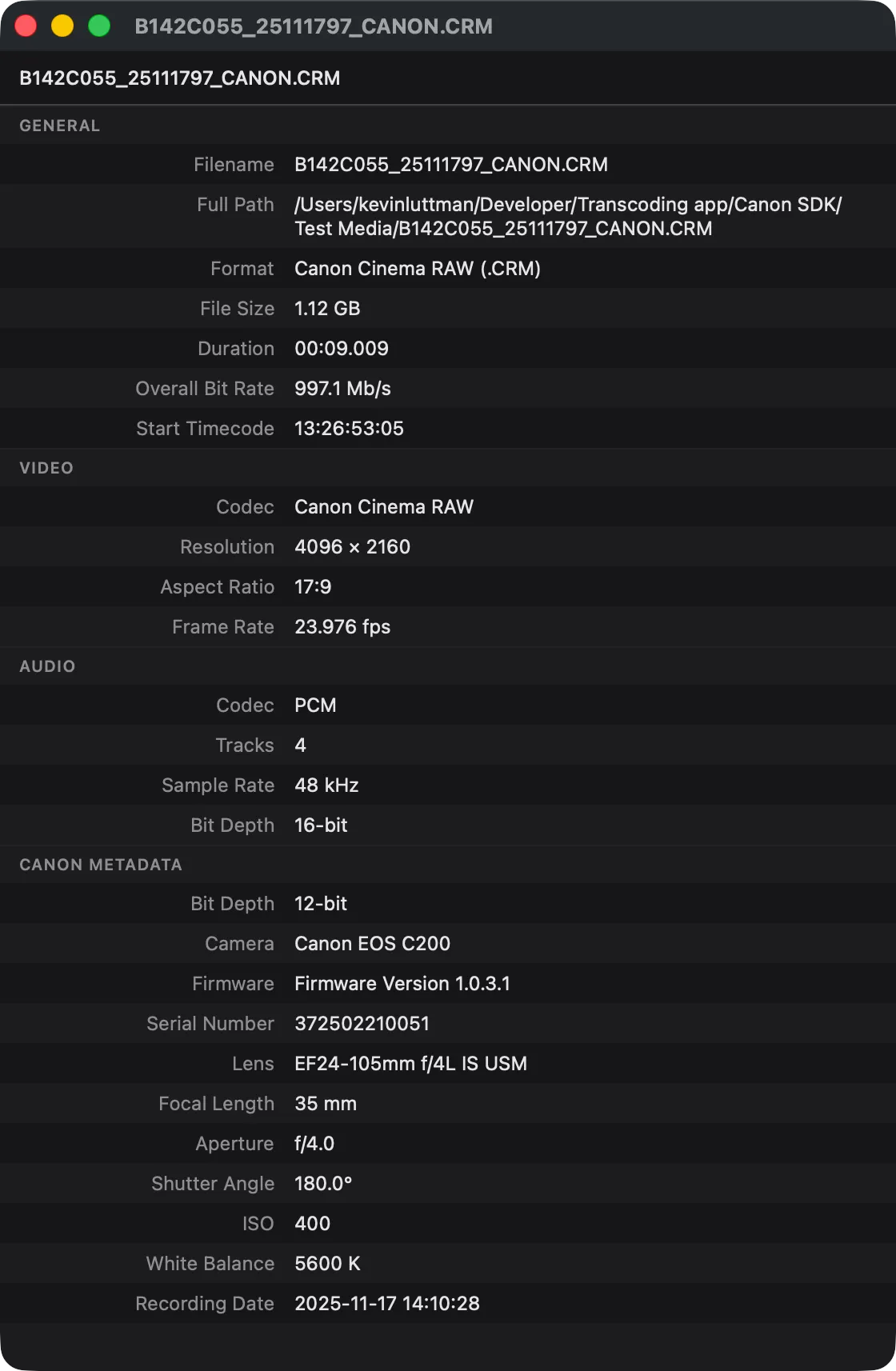
Everything your Canon wrote into the clip, including camera, resolution, recorded color, ISO, white balance, lens, and shot info, is read straight from the .CRM and passed into your output. Your dailies pipeline, edit, and DIT logs stay intact.
Free to preview. $39 to encode.
Try every Canon RAW feature on real footage before you pay. The encode path is the only thing behind the Pro line.
- Import Cinema RAW Light .CRM (HQ/ST/LT)
- Preview and scrub in full quality
- Read full Canon metadata
- Encode to any ProRes / H.265 / DNxHR
- Every output gamma & gamut, exposure, white balance
- Anamorphic desqueeze, watch folders, CLI, REST API
Canon Cinema RAW Light FAQ
What is a .CRM file?
Which Canon cameras does Parallel Media Encoder support?
What is the difference between Cinema RAW Light HQ, ST, and LT?
Does PME match Canon's color science?
Can I choose Canon Log 2 / Log 3 and the output color space?
Does PME handle anamorphic Canon footage?
How much does Canon RAW support cost?
Related pages
Transcoding ARRI
ARRIRAW, ARRI HDE, and ARRICORE to ProRes via the official ARRI Image SDK.
Learn moreBRAW & R3D to ProRes
Blackmagic RAW, RED R3D, and ProRes RAW. Same workflow, different cameras.
Learn moreMXF to ProRes
Canon XF-AVC and Sony MXF. The compressed Cinema EOS path alongside RAW.
Learn moreFree to preview Canon RAW footage. $39 to encode.
Download Parallel Media Encoder and drop a Cinema EOS card on it. See for yourself before you pay.
Download FreeRequires macOS 14.5 or later. Apple Silicon required.
Get the download link sent to your email