
Watch folder transcoding for Mac
Point a folder at a preset and walk away. PME picks up new media once it has finished copying, encodes it in parallel, and moves the original aside so nothing is encoded twice. On local drives, NAS shares and LucidLink.
Requires macOS 14.5 or later. Apple Silicon required.
A watch folder on a network share scans every minute. Each new file waits until it has finished copying, is picked up, encodes with the Editorial Proxy preset into the output folder, and is verified against its source. Originals move to the PickedUp folder.
Illustration. Folder names and clips are examples.
How it works
From card offload to edit-ready files, hands-free
Every watch folder pairs a folder with a preset and an output folder. New media goes through the same parallel queue, with the same settings, as a file you added by hand.
-
Sources
Media arrives
- Camera card offload
- NAS share (SMB, NFS)
- LucidLink filespace
-
Watch folder
/Volumes/NAS/Ingest
- Scans every 1–60 minutes
- Includes subfolders
- Waits until each file has fully copied
-
Encode queue
Your preset
- Codec, LUT and timecode settings
- Encodes in parallel
- Optional output verification
-
Output folder
/Volumes/NAS/Proxies
- ProRes, H.265, H.264 or DNxHR
- Optional filename suffix
- Ready to edit
In the app
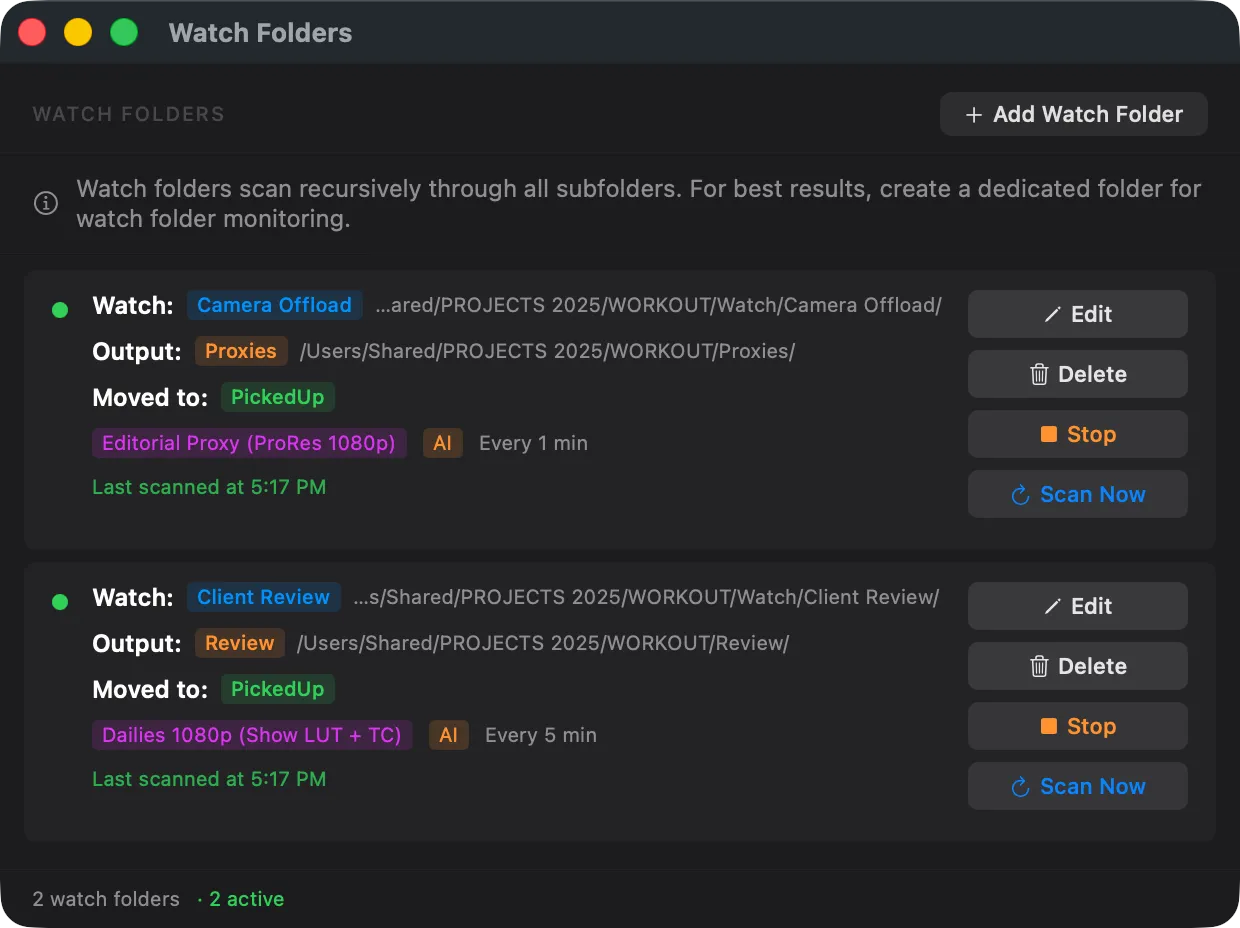
Every folder at a glance
The Watch Folders window shows where each folder watches and writes, its preset and scan interval, and when it last scanned. Edit, stop or scan any folder in one click. Folders an AI assistant set up are tagged with its name.
Built to run unattended
Safe to leave running overnight
Watch folders handle the cases that break unattended ingest: files that are still arriving, files that were already done, and encodes that fail.
Waits for copies to finish
A file is only picked up once it has stopped changing across two scans, so a card offload or network copy still in progress is never grabbed half-written.
Never encodes a file twice
Once a file is queued, the original moves to a PickedUp folder, or a destination you choose on the same volume. To process it again, move it back.
Failures are set aside
If an encode fails for good, its source moves to a Failed folder next to PickedUp, so you can see exactly which files need attention.
Verified outputs
Turn on verification and every output is checked against its source after encoding: frame count, duration, timecode, audio and colour.
Runs without the app open
The pme background service can watch folders on its own, and once installed with pme service install it resumes them at login. Open the app and it takes them over.
No loops, no overlaps
PME refuses an output folder inside the watch folder, and watch folders can't overlap, so one folder's output never feeds another.
App, terminal or AI
Drive the same folders from anywhere
A watch folder added from the terminal or by an AI assistant appears in the Watch Folders window right away. All three work on the same folders, so you can set one up in the app and script the rest.
From the terminal
pme watch adds, edits, starts, stops and scans folders. --dry-run
checks the settings and lists media already in the folder before anything moves.
pme watch add \
  --folder /Volumes/Ingest/DailyRushes \
  --output /Volumes/Export/Proxies \
  --preset "ProRes 422 Proxy" \
  --interval 5 \
--suffix "-Proxy" --dry-runFrom your AI assistant
Ask Claude, Codex or Gemini CLI. With Pro, PME’s MCP server creates, changes, starts, stops and scans watch folders, and explains what each one is doing.
The settings check out. Ingest already holds 3 clips, and they would be picked up on the first scan. Create the watch folder and start it?
Ingest is being watched. New files are picked up once they finish copying, and the originals move to PickedUp.
Illustrative session. Your assistant’s wording will vary.
Watch folders over MCPNetwork shares
Works with your NAS, LucidLink, or any shared volume
Enter your network credentials once. They're stored in Keychain and never leave your Mac. If the share disconnects, PME remounts it automatically on the next scan.
- SMB and NFS shares
- Credentials secured in macOS Keychain
- Auto-remount on disconnect
Common setups
One folder per job
DIT cart dailies
Offload cards into a watch folder and get dailies with the show LUT and source timecode while the next card copies.
Dailies 1080p (Show LUT + TC)LucidLink proxy ingest
Watch a folder on the filespace with the LucidLink (Proxy) preset, which caps the bitrate so proxies stay light to stream.
LucidLink (Proxy)Editorial and review drops
Give editors or clients a NAS folder to drop media into, and collect ProRes or H.265 copies in the output folder.
Editorial Proxy (ProRes 1080p)How to set up watch folder encoding on Mac
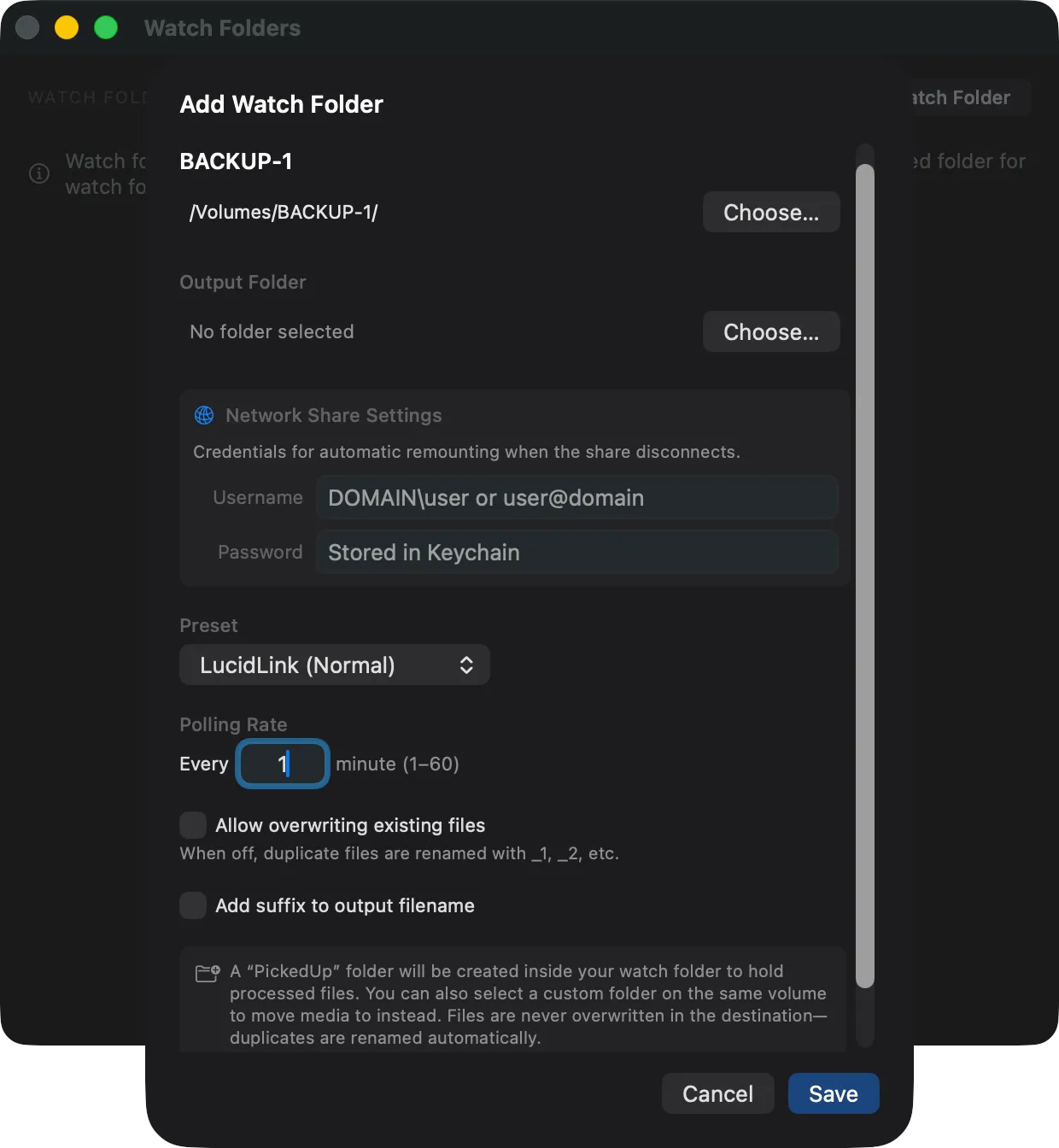
Create a watch folder
Pick a folder, assign a preset, and set a polling interval. PME scans the folder and its subfolders every 1–60 minutes and queues new media automatically.
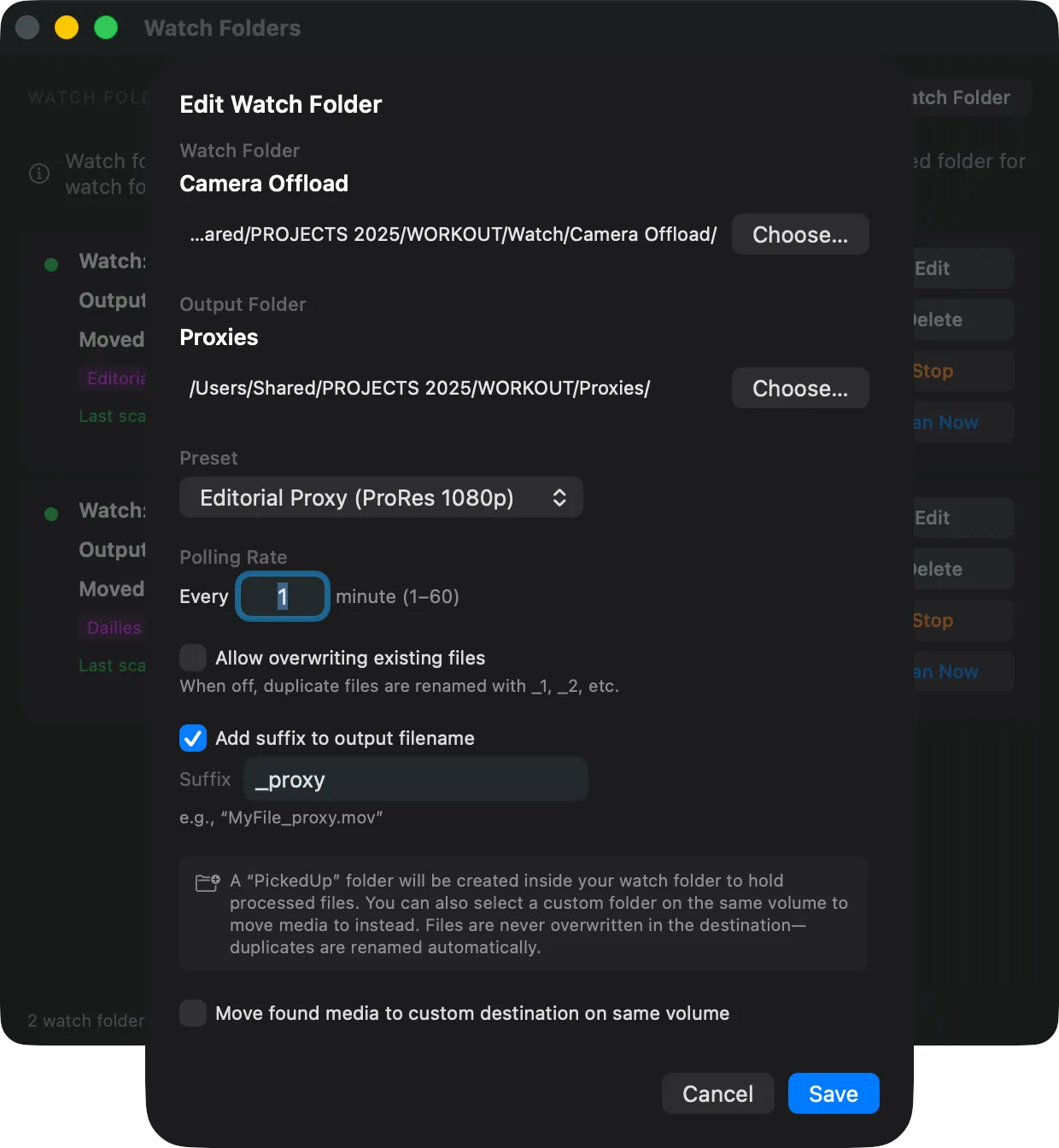
Drop files and walk away
Copy files in from a card offload, Finder or another app. Once a file has finished copying, PME picks it up on the next scan and encodes it in parallel with the rest of the queue.
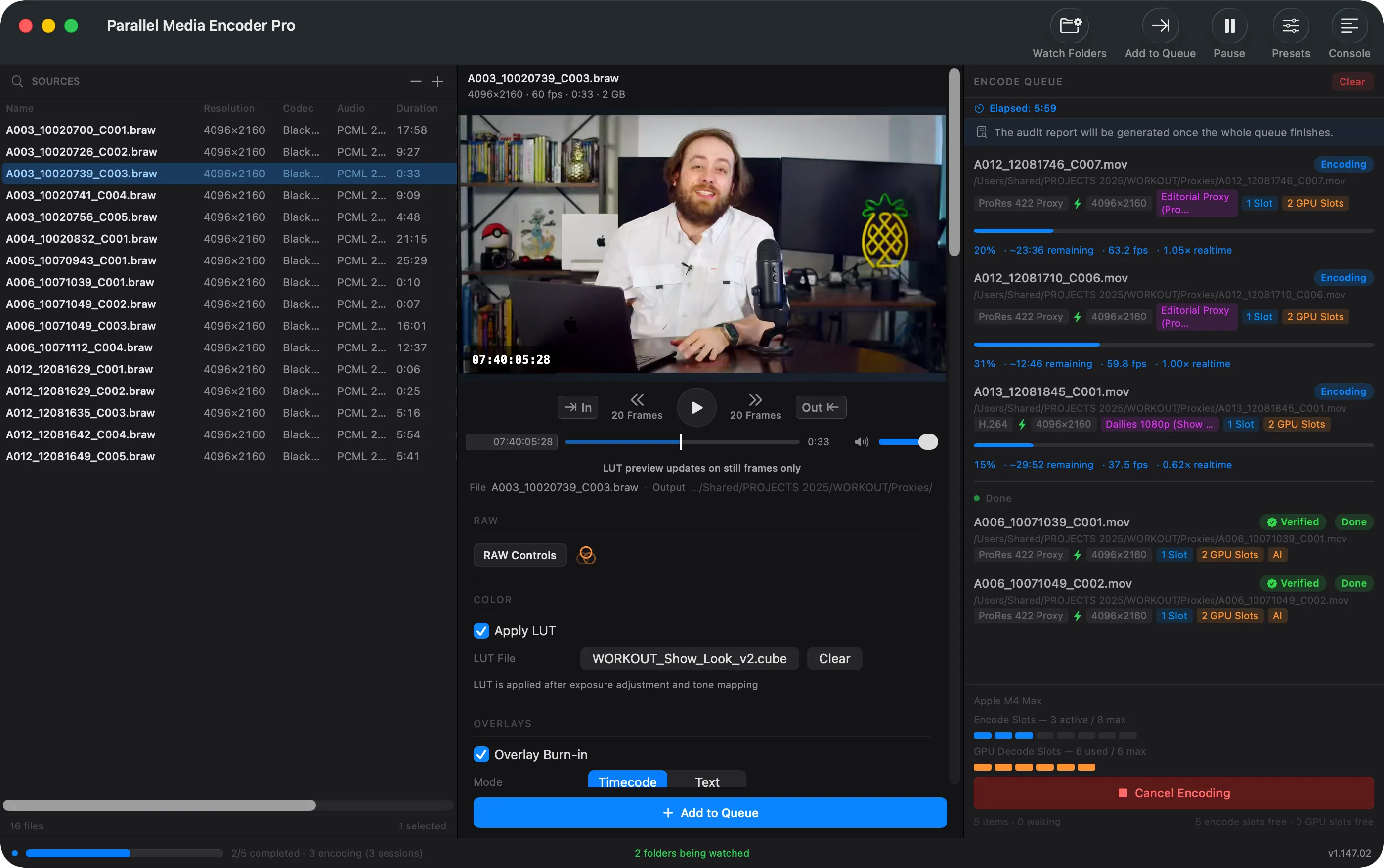
Pick up your transcoded files
Encoded files land in your chosen output folder, ready for editing. Originals move to a PickedUp folder so nothing gets processed twice.
Watch folder FAQ
Is watch folder encoding free?
What if a file is still copying when PME scans?
Do watch folders run when the app is closed?
Are watch folder outputs verified?
What happens when an encode fails?
Can I use watch folders with network shares?
How many watch folders can I set up?
Can I manage watch folders from the command line or an AI assistant?
Will the same file get encoded twice?
Does it work with all codecs and presets?
Related features
Parallel Encoding
Encode 2–10 files simultaneously on Apple Silicon. Hardware-aware scheduling across M1–M6 chips.
Learn moreMXF to ProRes
Convert Sony and Canon MXF files to ProRes, H.265, or DNxHR with metadata preservation.
Learn moreMedia Encoder MCP
Let Claude, Codex or Gemini CLI probe footage, queue encodes and run watch folders.
Learn moreReady to automate your transcoding?
Download free. Watch folders unlock with a one-time $39 Pro purchase.
Download FreeRequires macOS 14.5 or later. Apple Silicon required.
Get the download link sent to your email