
Getting Started Guide
Download
Parallel Media Encoder requires macOS 14.5 or later running on Apple Silicon (M1 or newer).
Free
$0Core codecs, batch queue, HDR support. Great for trying the app or lightweight workflows.
Download FreePro
ProParallel encoding, RAW workflows, 3D LUTs, CLI automation, and every codec unlocked.
Buy Pro LicenseInstall
- Download the
.dmgfile from this website (use the Download Free link above). - Open the
.dmgto mount the installer. - Drag Parallel Media Encoder into your Applications folder.
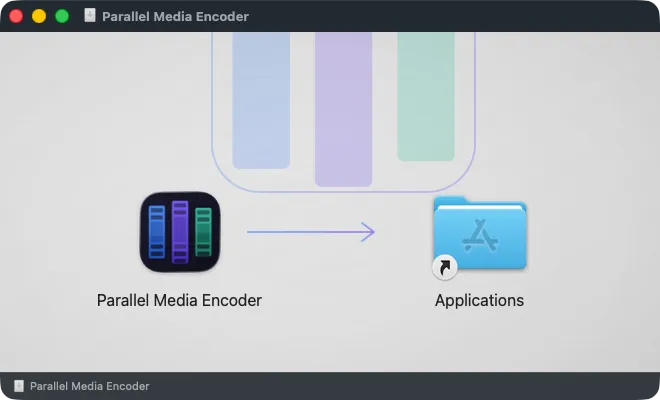
macOS security note
On first launch, macOS may block the app because it was downloaded from the internet. Right-click (or Control-click) the app and choose Open. You only need to do this once.
Install CLI Tools (Optional)
Advanced (not required for normal use)
The CLI is for automation and scripting workflows. You do not need it to use the app. Everything in Parallel Media Encoder works through the normal graphical interface. Skip this section if you just want to transcode files.
To use the pme command-line tool, install it from within the app.
- Open Parallel Media Encoder.
- In the menu bar, click Parallel Media Encoder → Install CLI Tool…
- Follow the prompt to install. This creates a symlink so you can run
pmefrom any terminal.
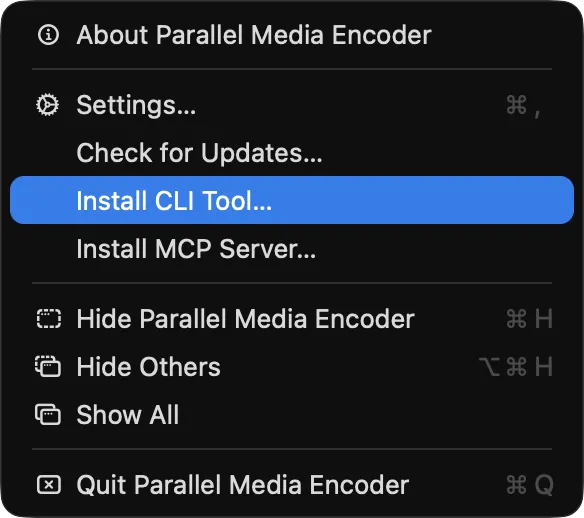
Once installed, verify it works by running:
pme --version The CLI requires a Pro license for transcoding. The probe and inspect commands are free.
Using Claude, Codex or Gemini CLI? You don't need the CLI link for that: choose Parallel Media Encoder → Install MCP Server… instead. See the MCP server guide.
First Encode
Follow these steps to transcode your first file.
Add source files
Launch the app and drag video files (or folders) into the source panel.
Choose a codec
Select an output codec. H.264, HEVC, ProRes, and more are available.
Set output location
Pick where encoded files should be saved.
Queue and start
Click "Add to Queue" then hit "Start Encoding" to begin.
Monitor progress
Track each file's progress in the encode queue.
Activate Pro
After purchasing a Pro license, activate it with either method:
Via the app
- Open Parallel Media Encoder.
- Open Settings → License (or choose Upgrade to Pro… from the app menu).
- Paste your license key and click Agree and Activate (Activate if you have already accepted the License Terms).
Via the command line
If you prefer the terminal, run:
pme license activate YOUR-KEY Replace YOUR-KEY with your license key: a PME-XXXXX-XXXXX-XXXXX-XXXXX key from us, or the key you received from Gumroad. Activation needs an internet connection; after that, Pro works offline for up to 30 days at a time. To move Pro to another Mac, deactivate it on this one first (Deactivate This Mac in Settings → License, or pme license deactivate) to free its seat. If that Mac is unavailable, activate on the new one: when every seat is in use, Settings → License lists the Macs holding them, each with Replace. See the pme license reference.
What's Next
Explore the rest of the documentation to get the most out of Parallel Media Encoder.